[Deployment] Blue-Green 무중단 배포 전략
Docker 환경에서의 Grafana Blue-Green 무중단 배포 전략에 대한 탐구 및 실제 구현 (feat. Gemini)
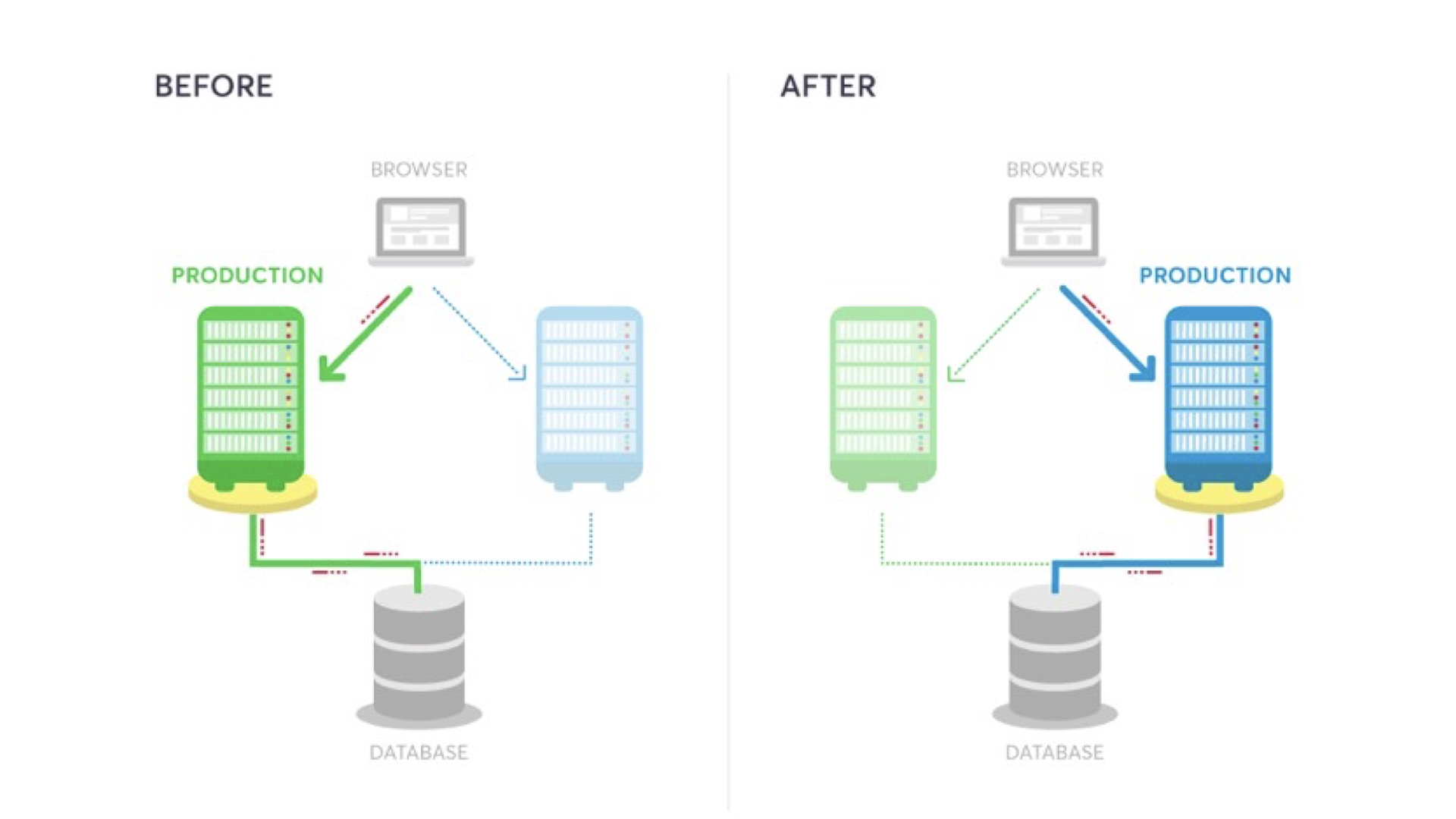
Grafana를 활용한 Blue-Green 무중단 배포 구축
구축 환경
기본적으로 Docker(Docker Compose) 환경에서 구축을 진행
- Grafana를 기본적인 앱으로 진행
- Nginx를 통한 리버스 프록시 환경 구축
코드 구성
1. 📂 파일 구조
1
2
3
4
5
6
7
8
/my-project
├── docker-compose.yaml
├── deploy.sh
└── nginx/
    ├── nginx.conf           # 메인 뼈대 설정
    ├── service_blue.conf    # Blue 전용 설정
    ├── service_green.conf   # Green 전용 설정
    └── service.conf         # 현재 활성화된 설정 (자동 생성됨)
2. docker-compose.yaml
Blue와 Green 두 개의 Grafana 인스턴스와 이를 중계할 Nginx를 정의
1
2
3
4
5
6
7
8
9
10
11
12
13
14
15
16
17
18
19
20
21
22
23
24
25
26
27
28
29
30
31
32
33
34
35
36
services:
  # Blue 인스턴스
  grafana-blue:
    image: grafana/grafana:12.4 # 12.4 버전 환경
    container_name: grafana-blue
    restart: unless-stopped
    ports:
      - "3003:3000"
    volumes: &grafana-volumes
      - "storage:/var/lib/grafana"
      - "../local/grafana.ini:/etc/grafana/grafana.ini"

  # Green 인스턴스
  grafana-green:
    image: grafana/grafana:12.3 # 12.3 버전 환경
    container_name: grafana-green
    restart: unless-stopped
    ports:
      - "3004:3000"
    volumes: *grafana-volumes

  # 리버스 프록시 Nginx
  nginx-proxy:
    image: nginx:latest
    container_name: nginx-proxy
    volumes:
      - ./nginx/nginx.conf:/etc/nginx/nginx.conf
      - ./nginx/service.conf:/etc/nginx/conf.d/service.conf
    ports:
      - "80:80"
    depends_on:
      - grafana-blue
      - grafana-green

volumes:
  storage: {}
3. Nginx 설정
nginx/nginx.conf(메인 뼈대)http 블록 안에 service.conf를 include 하는 것이 핵심
1
2
3
4
5
6
7
8
9
10
11
 user  nginx;
 worker_processes  auto;
 events { worker_connections 1024; }

 http {
     include       /etc/nginx/mime.types;
     default_type  application/octet-stream;

     # 배포 스크립트가 교체할 설정 파일을 여기서 로드
     include /etc/nginx/conf.d/service.conf;
 }
nginx/service_blue.conf(Green도 동일 구조)OAuth 토큰 대응을 위해 프록시 버퍼 설정을 포함
1
2
3
4
5
6
7
8
9
10
11
12
13
14
15
16
17
18
19
20
 upstream grafana_server {
     server grafana-blue:3000; # Green일 경우 grafana-green
 }

 server {
     listen 80;

     location / {
         proxy_pass http://grafana_server;
         proxy_set_header Host $host;
         proxy_set_header X-Real-IP $remote_addr;
         proxy_set_header X-Forwarded-For $proxy_add_x_forwarded_for;
         proxy_set_header X-Forwarded-Proto $scheme;

         # OAuth 인증을 위한 버퍼 확장
         proxy_buffer_size          128k;
         proxy_buffers              4 256k;
         proxy_busy_buffers_size    256k;
     }
 }
4. 자동 배포 스크립트 (deploy.sh)
이미지 최신화부터 헬스체크, Nginx 스위칭까지 자동화하며 미사용 이미지를 삭제
⚠️ 최초 실행을 위해 docker compose를 1회 실행 후 사용
스크립트 코드
1
2
3
4
5
6
7
8
9
10
11
12
13
14
15
16
17
18
19
20
21
22
23
24
25
26
27
28
29
30
31
32
33
34
35
36
37
38
39
40
41
42
43
44
45
46
47
48
49
50
51
52
53
54
55
56
57
58
 #!/bin/bash

 # 1. 현재 실행 중인 대상 확인
 EXIST_BLUE=$(docker compose ps --services --filter "status=running" | grep "grafana-blue")

 if [ -z "$EXIST_BLUE" ]; then
     TARGET_COLOR="blue"
     BEFORE_COLOR="green"
 else
     TARGET_COLOR="green"
     BEFORE_COLOR="blue"
 fi

 echo "🚀 [$TARGET_COLOR] 배포 프로세스를 시작합니다..."

 # 2. 새로운 컨테이너 실행
 docker compose up -d grafana-$TARGET_COLOR

 # 3. 헬스 체크 (최대 30초)
 echo "⌛ $TARGET_COLOR 서버 응답 확인 중..."
 for i in {1..15}; do
     STATUS=$(docker exec grafana-$TARGET_COLOR curl -s -o /dev/null -w "%{http_code}" http://localhost:3000/api/health)
     if [ "$STATUS" -eq 200 ]; then
         echo "✅ $TARGET_COLOR 준비 완료!"
         HEALTH="success"
         break
     fi
     sleep 2
 done

 if [ "$HEALTH" != "success" ]; then
     echo "❌ 배포 실패: $TARGET_COLOR 서버가 응답하지 않습니다."
     exit 1
 fi

 # 4. Nginx 설정 교체 및 리로드
 cp ./nginx/service_${TARGET_COLOR}.conf ./nginx/service.conf
 docker exec nginx-proxy nginx -s reload

 echo "✨ [$TARGET_COLOR] 서비스 전환 성공!"

 # 5. 이전 컨테이너 중지
 echo "🛑 기존 [$BEFORE_COLOR] 컨테이너를 중지합니다."
 docker compose stop grafana-$BEFORE_COLOR

 # ---------------------------------------------------------
 # 6. 리소스 정리 (Resource Prune)
 # ---------------------------------------------------------
 echo "🧹 미사용 이미지 정리를 시작합니다..."

 # -f (force): 확인 절차 없이 즉시 삭제
 # dangling=true: 태그가 해제된(업데이트로 인해 밀려난) 이미지만 삭제
 docker image prune -f --filter "dangling=true"

 # (옵션) 미사용 네트워크 정리 (현재 어떤 컨테이너도 연결되지 않은 네트워크만 삭제)
 docker network prune -f

 echo "✅ 모든 배포 프로세스가 완료되었습니다!"
실행 결과
1
2
3
4
5
6
7
8
9
10
11
 🚀 [green] 배포 프로세스를 시작합니다...
 ⌛ green 서버 응답 확인 중...
 ✅ green 준비 완료!
 2026/02/27 00:09:46 [notice] 103#103: signal process started
 ✨ [green] 서비스 전환 성공!
 🛑 기존 [blue] 컨테이너를 중지합니다.
 [+] stop 1/1
  ✔ Container grafana-blue Stopped                                                                                                                                                                                                                                                                                      0.2s
 🧹 미사용 이미지 정리를 시작합니다...
 Total reclaimed space: 0B
 ✅ 모든 배포 프로세스가 완료되었습니다!
트러블슈팅
1. upstream 지시어 위치 오류
1
nginx: [emerg] "upstream" directive is not allowed here
- 원인
- upstream은 반드시 http (…) 블록 안에 있어야 하는데 파일 최상단에 작성
- 해결
- 메인
nginx.conf를 뼈대로 잡고,include방식으로 내부 설정을 분리하여 해결
- 메인
2. 마운트 경로가 폴더로 생성되는 현상
1
pread() "service.conf" failed (21: Is a directory)
- 원인
- 호스트에 파일이 없는 상태에서 볼륨 매핑 시 도커가 이를 디렉토리로 생성
- 해결
- 잘못 생성된 디렉토리 삭제 후,
cp로 미리 빈 파일을 생성하여 파일 매핑 유도
- 잘못 생성된 디렉토리 삭제 후,
3. OAuth 로그인 시 502 에러
1
502 Bad Gateway (로그: upstream sent too big header)
- 원인
- OAuth 토큰 헤더가 Nginx 기본 버퍼(4k/8k)를 초과
- 해결
proxy_buffer_size 128k;등 버퍼 관련 설정을 추가하여 해결
4. Nginx 문법 오류 (세미콜론 누락)
1
nginx: [emerg] unexpected "}"
- 원인
server grafana-blue:3000뒤에 세미콜론(;)을 빠뜨려 문법이 깨짐 (뻘짓)
- 해결
- 모든 지시어 끝에
;를 확인하고nginx -t로 사전 검토를 생활화
- 모든 지시어 끝에
참고 사항
현재 올라온 버전 확인 (Docker)
1
2
3
docker exec nginx-proxy cat /etc/nginx/conf.d/service.conf | grep "server grafana-"

## 결과: server grafana-green:3000;
Dockerfile 사용 시 참고
Dockerfile을 통해 별도의 env와 같은 추가 설정을 할 경우 Dockerfile 버전 명시를 위한 설정
Dockerfile
1
2
3
4
5
6
7
8
9
 # 1. 외부(docker-compose)에서 주입받을 변수 선언
 ARG GRAFANA_VERSION=latest

 # 2. 주입받은 변수를 이미지 태그에 사용
 FROM grafana/grafana:${GRAFANA_VERSION}

 USER root

 # ...
docker-compose.yaml
1
2
3
4
5
6
7
8
9
10
11
12
13
14
15
16
17
18
19
20
21
22
23
24
25
 services:
   grafana-blue: # Blue 인스턴스
     build:
       context: .
       args:
         - GRAFANA_VERSION=12.4 # Blue는 12.4로 빌드 (Dockerfile에서 받을 변수)
     image: grafana/grafana:12.4 # 12.4 버전 환경
     container_name: grafana-blue
     restart: unless-stopped
     ports:
       - "3003:3000"
     volumes: &grafana-volumes
       - "storage:/var/lib/grafana"
       - "../local/grafana.ini:/etc/grafana/grafana.ini"
   grafana-green: # Green 인스턴스
     build:
       context: .
       args:
         - GRAFANA_VERSION=12.3 # Blue는 12.3로 빌드 (Dockerfile에서 받을 변수)
     image: grafana/grafana:12.3 # 12.3 버전 환경
     container_name: grafana-green
     restart: unless-stopped
     ports:
       - "3004:3000"
     volumes: *grafana-volumes
위의 코드 작성을 통해 현재 배포된 Grafana의 버전에 맞는 Dockerfile 버전 지정이 가능
이 기사는 저작권자의 CC BY 4.0 라이센스를 따릅니다.